---
title: "Craft CMS: Control your tracking codes from the control panel"
date: "10/7/2017, 1:59 AM"
category: "Development"
topics: ["CraftCMS", "tutorial", "twig"]
canonical: "https://sveltekit.davidhellmann.com/blog/craft-cms-control-your-tracking-codes-from-the-control-panel"
section: "blog"
---

# Craft CMS: Control your tracking codes from the control panel

![Craftcms thirdparty snippets 02](https://static.davidhellmann.com/assets/com_davidhellmann/images/blog/craft-cms-control-your-tracking-codes-from-the-control-panel/craftcms-thirdparty-snippets-02.jpg)

<p>We launch a new website, and shortly before we go online, the question of whether the Google Analytics code is implemented comes up. It's not a problem at all, but it’s usually not just the Google Analytics tracking code. Maybe you need services like Hotjar or something else. Including codes from services like this without touching the code itself would be nice. Here is a solution.</p><h2>What we need:</h2><ul><li><a href="https://github.com/engram-design/SuperTable">SuperTable Plugin</a> from Engram Design</li><li><a href="https://github.com/Pennebaker/craftcms-thearchitect">The Architect</a> from Pennebaker</li></ul><h2> Let’s create our fields</h2><p>We control this in the Globals. We just need a SuperTable field with three subfields. </p><ul><li>Snippet Name: It is not important just to show the User in the CP what code it is without searching within the code itself.</li><li>Snippet Status: To active / deactivate the Code</li><li>Snippet Code: The code itself</li></ul><p>Here is the Code to create the Fields:</p>

```json
{
    "groups": [
        "Globals"
    ],
    "fields": [
        {
            "group": "Globals",
            "name": "Global: Third Party Snippets",
            "handle": "globalThirdPartySnippets",
            "instructions": "",
            "required": false,
            "type": "SuperTable",
            "typesettings": {
                "fieldLayout": "row",
                "staticField": null,
                "selectionLabel": "Add a row",
                "maxRows": null,
                "minRows": null,
                "blockTypes": {
                    "new": {
                        "fields": {
                            "new1": {
                                "name": "Snippet Name",
                                "handle": "snippetName",
                                "instructions": "",
                                "required": 1,
                                "type": "PlainText",
                                "width": "",
                                "typesettings": {
                                    "placeholder": "",
                                    "maxLength": "",
                                    "multiline": "",
                                    "initialRows": 4
                                }
                            },
                            "new2": {
                                "name": "Snippet Status",
                                "handle": "snippetStatus",
                                "instructions": "",
                                "required": 0,
                                "type": "Lightswitch",
                                "width": "",
                                "typesettings": {
                                    "default": ""
                                }
                            },
                            "new3": {
                                "name": "Snippet Code",
                                "handle": "snippetCode",
                                "instructions": "",
                                "required": 1,
                                "type": "PlainText",
                                "width": "",
                                "typesettings": {
                                    "placeholder": "",
                                    "maxLength": "",
                                    "multiline": 1,
                                    "initialRows": 8
                                }
                            }
                        }
                    }
                }
            }
        }
    ],
    "globals": [
        {
            "name": "Third Party Snippets",
            "handle": "thirdPartySnippets",
            "fieldLayout": {
                "Content": [
                    "globalThirdPartySnippets"
                ]
            }
        }
    ]
}
```

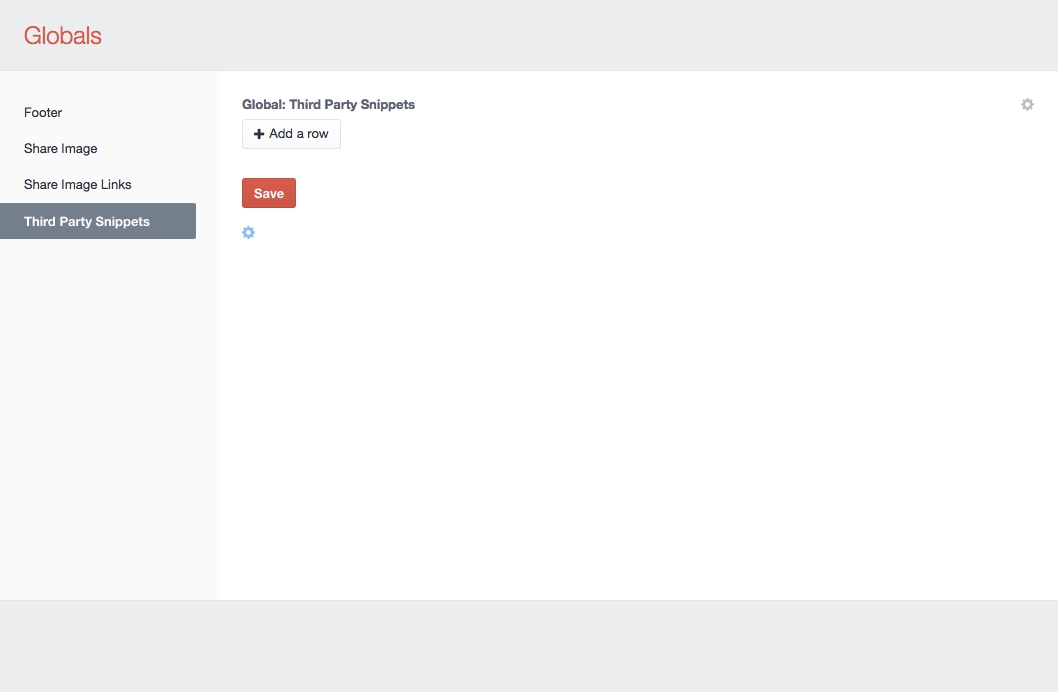
<p>In short: It creates the SuperTable field and the global. You can paste this code in the „Raw Input“ Field in „The Architect“ or make it on your own when you don’t have installed The Architect Plugin.</p><p>Now it just looks like this:</p>

![Craftcms thirdparty snippets 01](https://static.davidhellmann.com/assets/com_davidhellmann/images/blog/craft-cms-control-your-tracking-codes-from-the-control-panel/craftcms-thirdparty-snippets-01.jpg)

<h2>Add the Twig Code</h2><p>Now, we must include the code for this in our twig templates. I’ve included it in the <strong>_scripts.html</strong> file, which is included in the footer. </p><p>Here is the snippet:</p>

```twig
{# -- Third Party Snippets -- #}
{% set thirdPartySnippets = thirdPartySnippets.globalThirdPartySnippets is defined ? thirdPartySnippets.globalThirdPartySnippets %}
{% if thirdPartySnippets %}
  {% for row in thirdPartySnippets %}
    {% if row.snippetStatus %}
      {% if row.snippetName %}
        <!-- {{ row.snippetName }} -->
      {% endif %}

      {% if row.snippetCode %}
        {{ row.snippetCode | raw }}
      {% endif %}
    {% endif %}
  {% endfor %}
{% endif %}
```

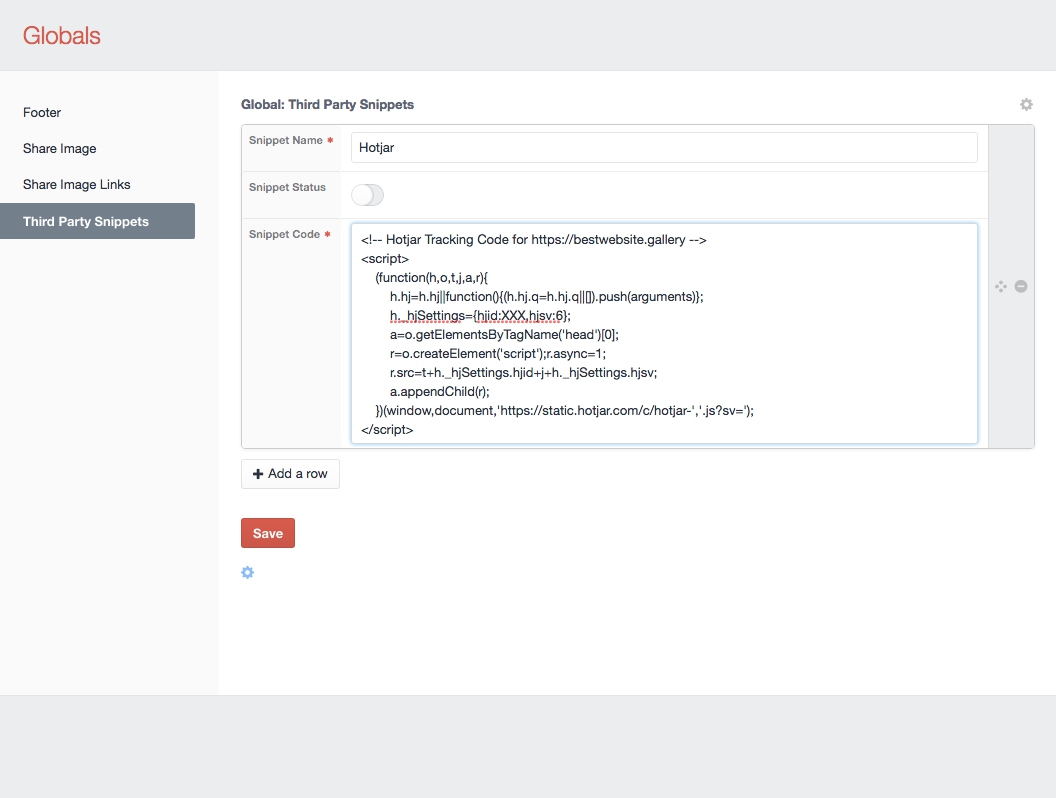
<p>We simply check if the global field exists, and then we loop over the content to include all the codes.</p><h2>Add a code</h2><p>Now, you can add codes in the CP and activate them whenever possible. You can also sort the different codes.</p><p>Here is Hotjar as an example:</p>

![Craftcms thirdparty snippets 02](https://static.davidhellmann.com/assets/com_davidhellmann/images/blog/craft-cms-control-your-tracking-codes-from-the-control-panel/craftcms-thirdparty-snippets-02.jpg)

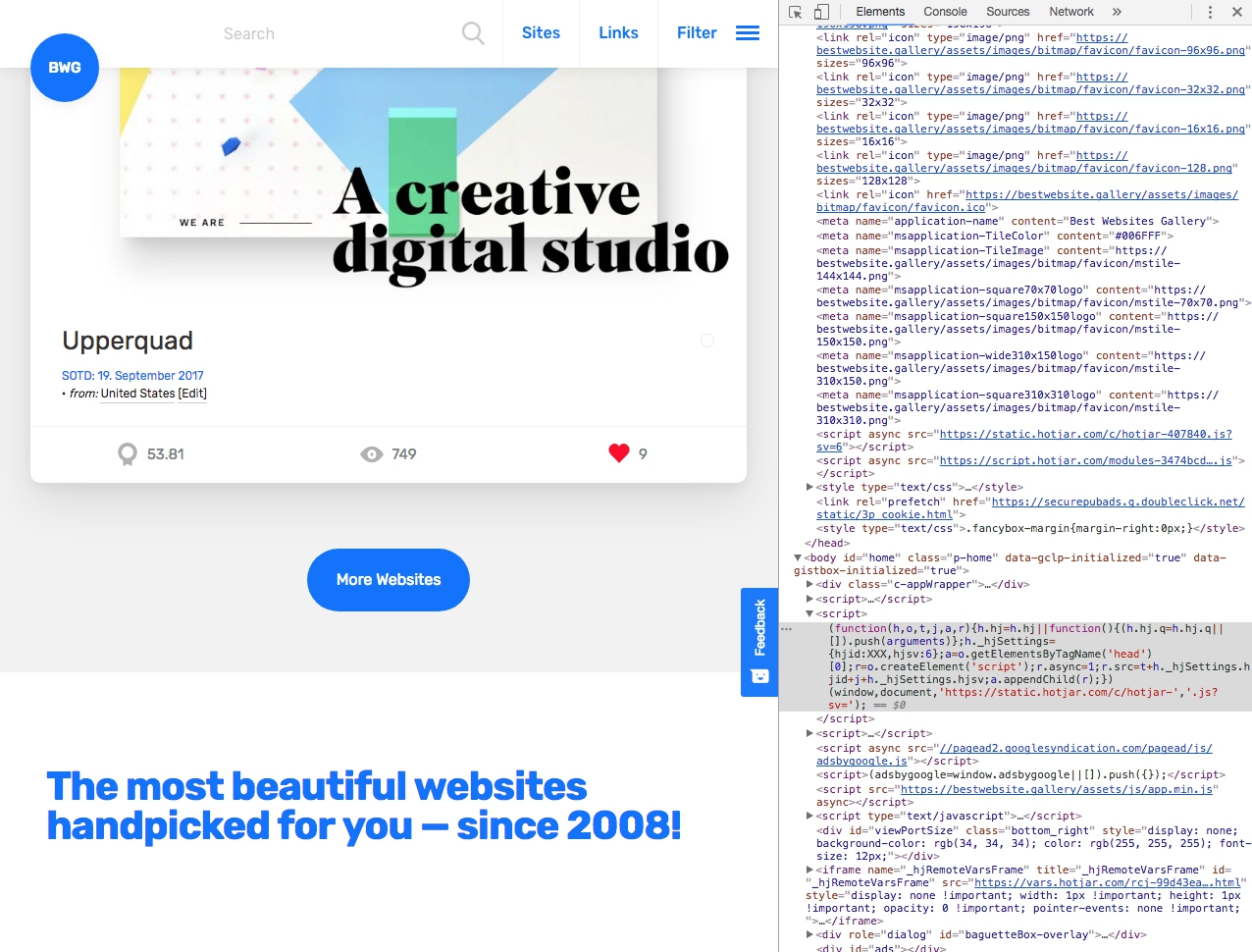
<p>And after activation, it must look like this:</p>

![Craftcms thirdparty snippets 03](https://static.davidhellmann.com/assets/com_davidhellmann/images/blog/craft-cms-control-your-tracking-codes-from-the-control-panel/craftcms-thirdparty-snippets-03.jpg)

<p>That’s it! Any suggestions?</p>